PDP-11 benchmark
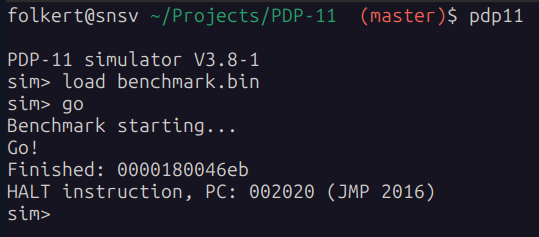
When you run it, you'll see after 10 seconds a value in hex: that's the number of iterations it could do in 10 seconds. It expects a working kw11-l in the system.
If you like you can assemble the source with e.g. this assembler. You can also run the .bin-file directly in e.g. simh like this:
set cpu 11/70
SET CLK 50HZ
load benchmark.bin
go
Please consider compiling the emulator with e.g. -march=native as that often speeds things up quite a bit.
Note: in this example the system-type is configured as an 11/70, but an 11/34, 40 and 45 should work as well. Maybe others too that I did not try (via simh).
The program should be loaded at address 01000 (octal) and executed from that address as well.
Note that there are two tests with the "with mmu"-version having the "highest priority" :-).
with mmu
- benchmark-w-mmu.asm source code (new version, also takes mmu into account)
- benchmark-w-mmu.bin loadable in simh with "load benchmark-w-mmu.bin" (also in kek with -T benchmark-w-mmu.bin)
- benchmark-w-mmu.raw bare metal image (no header of any kind)
without mmu
- benchmark.asm source code
- benchmark.bin loadable in simh with "load benchmark.bin" (also in kek with -T benchmark.bin)
- benchmark.raw bare metal image (no header of any kind)
results
Higher is better
c/c++ programs were compiled with -Ofast -march=native -mtune=native (like simh)
python3 programs were tested under pypy
| cpu | emulator or system | speed without mmu | WITH mmu | raw without mmu | raw WITH mmu | |
|---|---|---|---|---|---|---|
| AMD Ryzen 9 7950X3D | Ersatz-11 v7.3 | 18265.27% | 13109.96% | 00872149 | 003036d3 | |
| AMD Ryzen 9 7950X3D | simh v3.8-1 | 13877.97% | 6116.54% | 0066ac02 | 00167ea0 | |
| AMD Ryzen 9 7950X3D | p11 2.10i | 11947.32% | 5285.23% | 0058637c | 00136ff6 | |
| AMD Ryzen 9 7950X3D | Kek (git af29aa9) | 5500.74% | 3779.93% | 0028b20f | 000de6bf | |
| Apple M1 | Kek (git 11aa556) | 4736.07% | 4218.59% | 002309d0 | 000f83bd | |
| AMD Ryzen 9 7950X3D/Chrome | P.Nankervis (git 605cc23) | 4644.76% | 3223.63% | 00225ce4 | 000bdaff | |
| Intel Core i7-12700H | Kek (git 11aa556) | 4453.41% | 4138.11% | 0020f27c | 000f37f8 | |
| Intel N100 | Kek (git 11aa556) | 2396.82% | 2200.24% | 0011bb6b | 0008177d | |
| Intel i5-9400 | Kek (git 11aa556) | 2311.73% | 2159.37% | 00111a44 | 0007f104 | |
| Intel Core i9-14900HX | Kek (git 11aa556) | 2261.47% | 2084.91% | 0010bb17 | 0007aae8 | |
| Intel Core i5-6600k | Kek (git 11aa556) | 2084.98% | 1920.72% | 000f6cd4 | 00071054 | |
| Intel Core i5-8265U | Kek (git 11aa556) | 1987.64% | 1845.53% | 000eb478 | 0006c989 | |
| Raspberry Pi 5 | Kek (git 493a9f9) | 1872.94% | 1737.63% | 000ddb3b | 000663f3 | |
| AMD Ryzen 9 7950X3D | NWebber (git 485cdcc) | 1363.93% | 584.72% | 000a1732 | 00022682 | |
| AMD Ryzen 7 5700U | Kek (git 11aa556) | 1292.48% | 1296.54% | 00098fe1 | 0004c4ad | |
| Intel i5 750 | Kek (git 11aa556) | 1196.59% | 1111.84% | 0008da42 | 000416c8 | |
| Intel Xeon E5-2630 | Kek (git 11aa556) | 1146.9% | 1054.12% | 00087c2a | 0003e070 | |
| Teensy 4.1 | Kek (git 493a9f9) | 135.61% | 117.46% | 000100d7 | 00006e96 | |
| • | PDP-11/70 | + HyperCache & PEP-70 | 100% | 100% | 0000bd64 | 00005e26 |
| • | PDP-11/53 | KDJ11-SD | 65.56% | 62.28% | 00007c2d | 00003aa2 |
| • | PDP-11/73 | 62.18% | 59.52% | 000075c2 | 0000380a | |
| ESP32-P4 | Kek (git 1ff1f61) | 57.97% | 50.92% | 00006dca | 00002ff1 | |
| • | PDP-11/23 | KDJ11-A | 52.69% | 50.44% | 000063c9 | 00002f7c |
| ESP32-S3 | Kek (git 493a9f9) | 32.84% | 27.99% | 00003e33 | 00001a5a | |
| ESP32 | Kek (git 493a9f9) | 27.48% | 22.82% | 0000340d | 0000157c | |
| • | Micro-PDP-11/23 | KDF11-B M8189 | 23.6% | 22.3% | 00002cb3 | 000014fe |
| RPI RP2350 | Kek (git 493a9f9) | 13.95% | 12.85% | 00001a6a | 00000c18 | |
| ESP32-S2 | Kek (git 493a9f9) | 12.62% | 10.44% | 000017e5 | 000009d5 |
A big thanks to Jacob Ritorto who ran my benchmark on a real PDP-11/70 (with accelerator).
Also a big thanks to Hans Hübner for the run on an 11/23, 11/53 and an 11/73.
Note: data of other real PDP-11 systems is welcome!
example output